A game can accumulate thousands of Steam wishlists before launch and still fall short of its sales targets. Wishlists indicate interest, but they don't guarantee that players will buy the game. Steam wishlist conversion rate shows developers the relationship between wishlists and sales.
Some users are waiting for a discount, others are following a project out of curiosity and some may never return to the store page. Understanding what drives sales helps set realistic launch targets, plan marketing budgets and identify weaknesses in a game's presentation. Recent research also suggests that wishlist conversion varies considerably between projects, making a single industry-wide benchmark difficult to establish.
This guide examines the latest available benchmarks, explains how to interpret conversion data and covers practical ways to improve your Steam store page before launch.
What Is Steam Wishlist Conversion Rate?
The rate shows how wishlist interest translates into sales. But it can mean two different things: purchases by players who had wishlisted the game or total sales compared with launch wishlists. Mixing them up can lead to misleading sales forecasts.
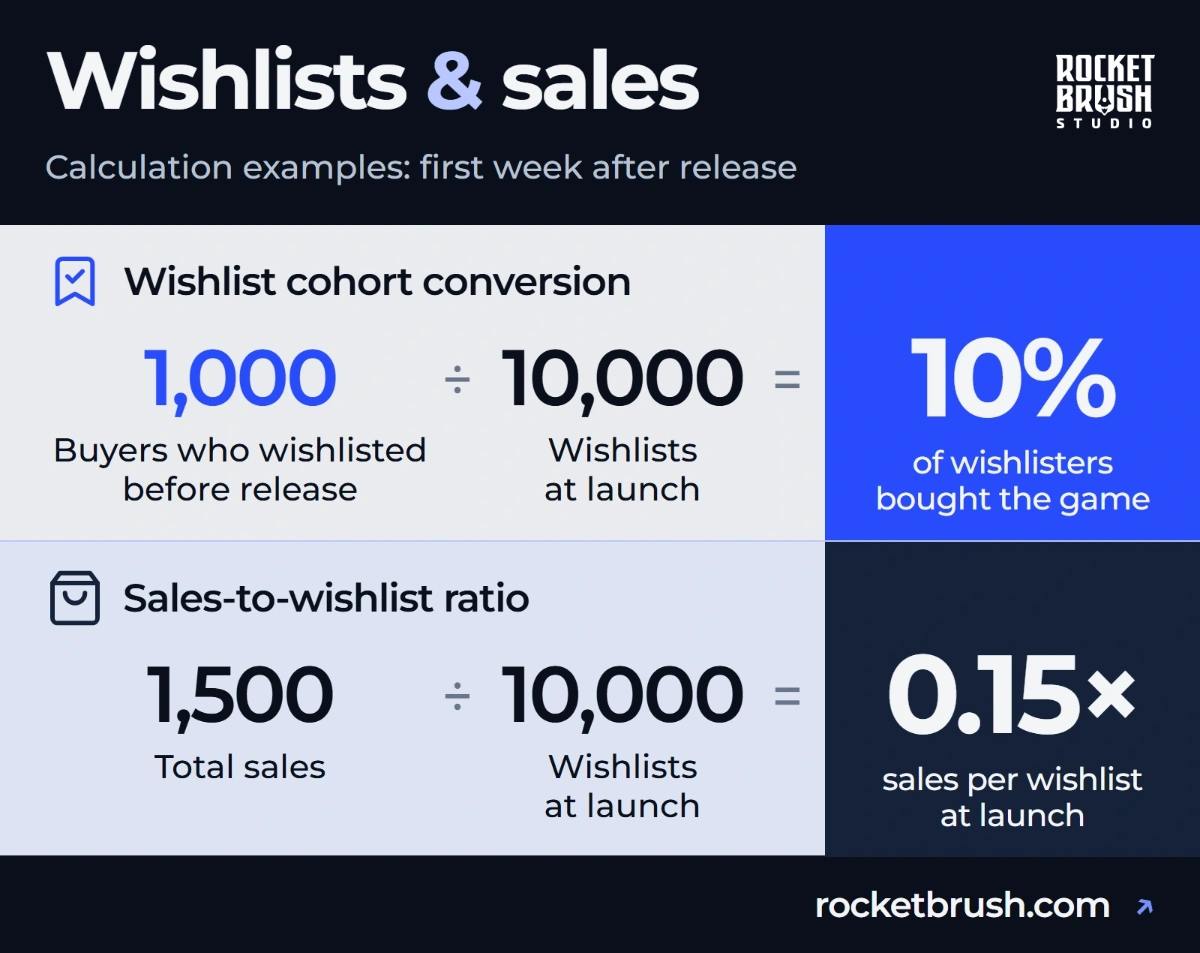
Wishlist conversion counts buyers from the launch wishlist cohort, while the sales-to-wishlist ratio uses all sales.
Wishlist-to-purchase conversion rate is the percentage of users who had wishlisted a game before launch and bought it during a defined period. In the example above, 1,000 of the 10,000 users buy during launch week: 10%.
Sales-to-wishlist ratio compares a game's total sales with its launch wishlist count. If a game launches with 10,000 wishlists and sells 1,500 copies during its first week, its sales-to-wishlist ratio is 0.15×, equivalent to 15% when expressed as a percentage.
These figures are not the same: total sales include purchases from people who never wishlisted the game, while the number of purchases directly attributed to wishlists measures a narrower group. This distinction matters when interpreting industry reports.
To calculate a meaningful benchmark for your own release, define three things first:
Starting point: the number of wishlists immediately before launch.
Measurement window: the first seven days, first month or another clearly defined period.
Sales metric: purchases from previous wishlisters or total copies sold, including organic sales.
Use the same definitions when comparing results across releases or evaluating changes to your marketing strategy.
Average Steam Wishlist Conversion Rate: Benchmarks and Studies
Valve itself doesn’t provide an official Steam average wishlist conversion rate. But that doesn’t mean there are no benchmarks. The most useful overviews come from independent research, developer surveys and analyses of released games.
The results differ because researchers use different criteria. For example, a recent study published in October 2026 provides a reason to be cautious about older estimates. Chris Zukowski's survey collected data from 160 games released between 2020 and 2025. It found that the median ratio of first-month sales to launch wishlists fell from 0.45× for games released in 2020–2022 to 0.22× for games released in 2023–2025. These figures include total sales rather than only purchases attributed to wishlists.
Steam Wishlist to Sales Conversion Rate: What Can You Expect?
These studies give you a starting point for estimating sales. Compare games with similar launch wishlist counts and check whether the figures cover the first week or first month:
Important: these are not interchangeable estimates of one universal conversion rate. For planning purposes, treat these numbers as reference points rather than promises.
Steam Wishlist Conversion Rate for Indie Games
Indie games vary widely in genre, price and audience size. When choosing a benchmark, look for games similar to yours and compare the same sales period. A first-week ratio for games with more than 25,000 launch wishlists may be a poor reference for a smaller release.
These studies highlight three points to consider:
Lower unit conversion can still mean more revenue. Gamalytic’s 2024 research found that higher-priced games generally sold fewer copies per launch wishlist but earned more revenue per wishlist. GameDiscoverCo’s 2025 analysis offers a numerical comparison: among games with more than 25,000 launch wishlists, excluding adult games, the median first-week sales-to-wishlist ratio was 0.14×. It was 0.10× when only games priced above $10 were included. This does not prove that cutting the price improves results.
Stronger converters also had better reviews. GameDiscoverCo compared selected strong and weak converters released from September 2024 to mid-September 2025. The selected top 20 had a median first-week user review score of 91%, versus 67% for the selected underperformers. This is a correlation, not proof that reviews caused the difference. Use recurring complaints to identify gaps between the game and players’ expectations.
More wishlists do not guarantee proportionally more sales. A large wishlist count is useful, but its commercial value depends on how much genuine purchase intent it represents. Some players add games to their lists after seeing a festival demo or a short viral clip, then lose interest before release.
For indie teams, the practical goal is not to maximize the wishlist count at any cost but to attract the right audience, communicate the game's value and give interested players convincing reasons to buy.
What Affects Wishlist Conversion?
A wishlist is a signal of interest, not a commitment to purchase. Several factors influence whether that interest turns into a sale:
Audience fit: compare your genre, tags and gameplay features with similar titles. Check whether your marketing attracts players looking for that experience.
Store page clarity: ask someone unfamiliar with the game to describe its core gameplay after viewing the first few screenshots and reading the short description.
Perceived quality: review the capsule, screenshots and trailer together. They should present consistent visual quality and accurately represent the game.
Price and perceived value: compare full prices, features and estimated playtime in similar games.
Release timing: check for competing releases in your genre and major Steam events around your launch date.
Reviews and social proof: look for recurring concerns about gameplay, performance or content in reviews and community discussions.
External visibility: use tagged campaign links and Steam’s UTM Analytics to see which tracked visits lead to wishlist additions. The report does not cover every visitor.
The next section covers the store page changes you can make to address these questions.
Steam Store Page Optimization: How to Improve Conversion
Store page optimization should begin with the information players need to make a purchase decision. The goal is not to make every element louder or more elaborate. It is to make the game's appeal immediately understandable and support it with credible evidence.
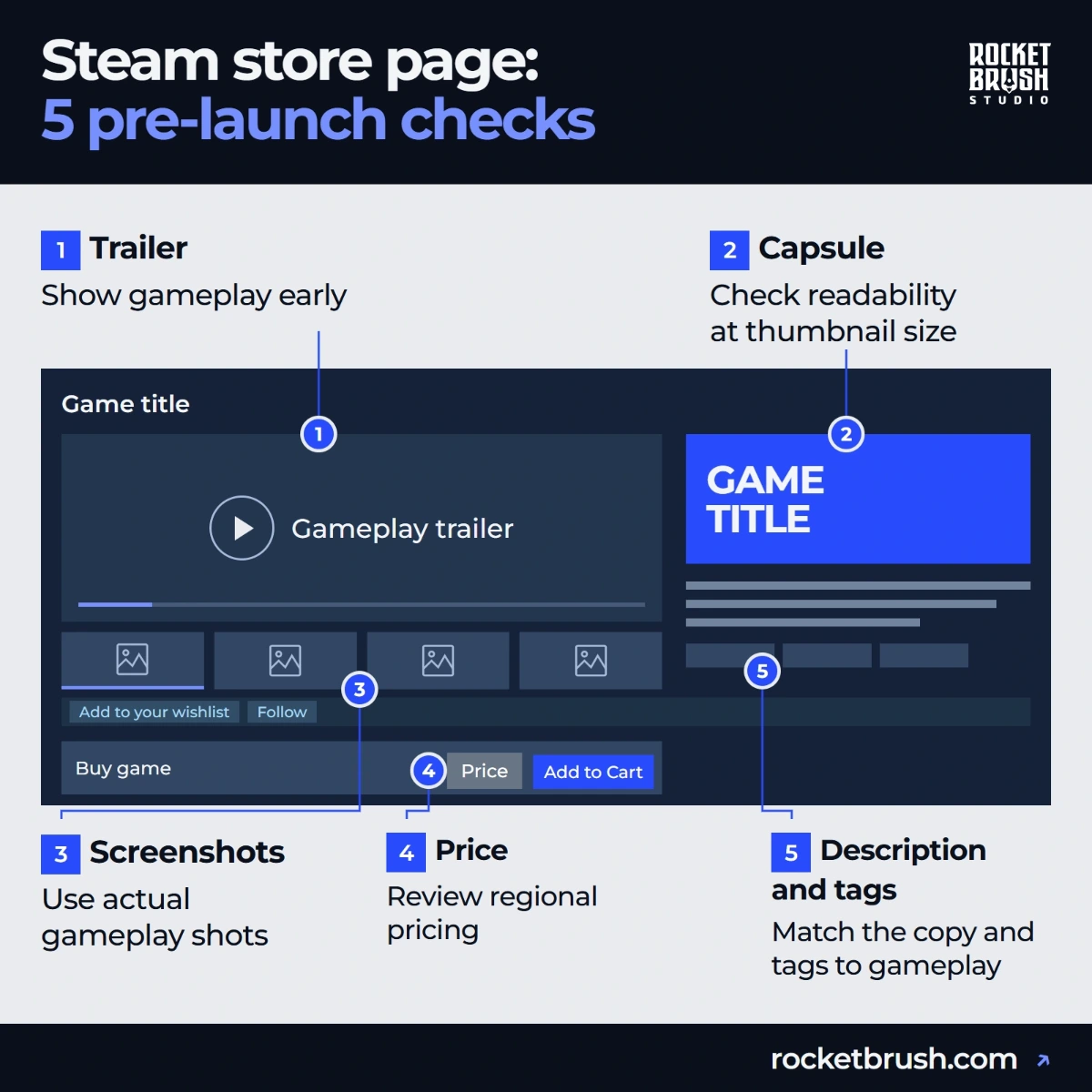
Start with these five checks, then use the sections below to review each part of your page.
Five pre-launch checks for a Steam store page.
Keep Capsule Art Readable at Every Size
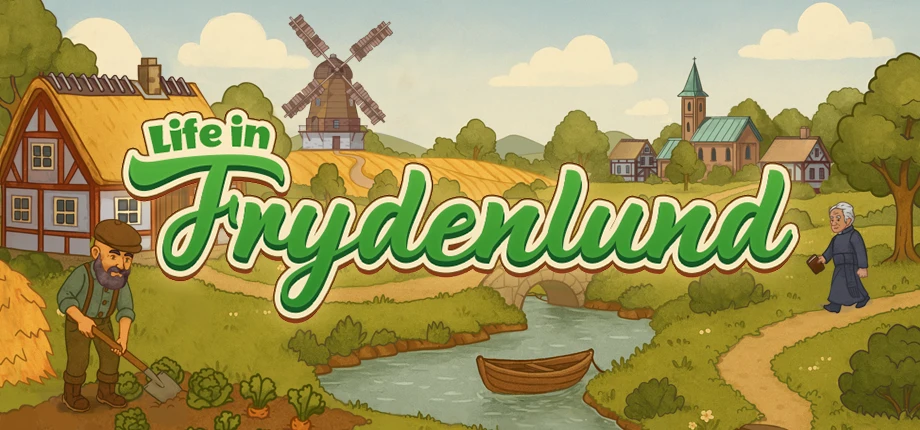
Capsule art is often the first visual encounter a player has with a game. The image below is our capsule for Life in Frydenlund. Its windmill, timber-framed houses and soft colors establish a cozy rural setting, while the large title stands out against the landscape.
Life in Frydenlund capsule art by RocketBrush Studio.
Capsule art appears in Steam's discovery interfaces, search results, recommendations and other placements, where it competes with many other titles for attention.
Main capsule (1232×706 px): the main carousel on the Steam homepage.
Small capsule (462×174 px): search results and store lists. Check the logo at 120×45 px, one of Steam’s generated thumbnail sizes.
Vertical capsule (748×896 px): seasonal sales and other sale pages.
Header capsule (920×430 px): the top of the game’s store page and some recommendation placements.
A common mistake is treating the capsule as a standalone illustration rather than a marketing asset. Beautiful artwork may still perform poorly if it does not distinguish the game from similar titles or communicate what makes it appealing.
Learn more about Steam capsule art design from our guide.
[[ref:steam-capsule-art]]
Show Gameplay in Trailers and Screenshots
Players need evidence that the game delivers the experience promised by its capsule. Use screenshots and trailers to show it:
Show actual gameplay early in the trailer. A long logo animation, cinematic introduction or sequence of atmospheric shots can delay the information viewers need most: what they will do in the game.
Avoid relying exclusively on concept art, promotional renders or cinematic images that do not represent gameplay. Players should understand what the finished product looks like and how it plays.
The Ways of Alchemy trailer below shows the card-based game in action, including its play area and action windows. These details help viewers understand what they will interact with.
Match Your Description and Tags to the Gameplay
Your short description should explain the game's central appeal in a few concise sentences. Lead with the genre or premise, then identify the feature that makes the experience distinctive.
Check these three things:
Describe what players do. Generic descriptions such as "an unforgettable adventure in a mysterious world" could apply to hundreds of games. A more useful description tells players what they will do, what challenges they will face or what makes the mechanics different.
Choose tags that match your gameplay. Tags also help communicate genre and gameplay to both players and Steam's discovery systems. Choose tags that accurately represent the game rather than selecting popular categories simply to reach a wider audience.
Keep your capsule, description and tags consistent. The page should read as a connected experience. If the capsule suggests a tactical RPG but the description emphasizes survival horror, visitors may leave because the game's identity is unclear.
Check Your Price, Demo and Launch Date
Review these three launch decisions:
Clear pricing. Compare similar games by content, replayability and multiplayer features. Check regional prices too: use Steam’s conversion tools as a starting point, then compare prices in your main markets. Local purchasing power matters as well as exchange rates.
Available demo. Let players try the core gameplay loop before buying. Use feedback from people outside the team to spot confusing mechanics and mismatched expectations, especially for a first release.
Release timing. Check upcoming releases in your genre, avoid launching alongside close competitors and leave time to prepare your build, launch materials and creator outreach. GameDiscoverCo found higher conversion in February and August, but founder Simon Carless warns: “we don’t believe your game would convert 50% better if you moved it there.”
Steam Next Fest can be valuable for reaching potential players and collecting wishlists, but developers should not assume every wishlist generated during a festival represents strong purchase intent. Track demo engagement, feedback and subsequent wishlist activity alongside the headline count.
[[ref:steam-next-fest]]
Use this checklist to spot problems before launch:
Decision
What to check
Possible problem
Price
Compare full prices and content in similar games.
The closest alternatives cost less, but the page does not explain what extra content players get.
Demo
Check how quickly players reach the core gameplay loop.
The demo spends most of its time on setup and ends before players try the main mechanic.
Release timing
Check that launch materials and the playable build are ready together.
Creator videos go live before the demo or store page is ready.
Track Traffic, Wishlists and Sales
To assess your Steam store page optimization, compare similar periods before and after each change. Note any sales, festivals or creator coverage that could also affect the results. Use these reports to check different parts of the journey:
Traffic Breakdown: check impressions, visits and traffic sources to see where visitors came from.
Wishlist Breakdown: check additions, deletions and purchases by players who had wishlisted the game. More visits without more wishlist additions may be a reason to review the page or the audience you are reaching.
Sales and Activations Reports: compare units sold and revenue. Keep discounted periods separate so that a price change does not distort the comparison.
UTM Analytics: tag links used in ads, creator campaigns or social posts. The report tracks wishlist additions, purchases and activations within 72 hours of a tracked visit. It covers trackable signed-in users, not every visitor.
Use these reports together to see where results changed. A before-and-after comparison alone does not prove that the page edit caused the difference.
How Does the Steam Algorithm Work?
Understanding how Steam distributes visibility helps developers distinguish between improving a store page and improving a game's discoverability.
Steam uses personalized recommendations and multiple discovery surfaces. Its systems consider factors related to what players enjoy and how they interact with games. There is no single public formula that developers can use to predict exactly how much visibility a particular wishlist count will generate.
Store page traffic and purchase conversion rate are not direct visibility factors. Purchases and player activity matter.
The most reliable source for platform-specific guidance is the Steamworks documentation on visibility. It explains the different visibility opportunities available to developers and how major updates and releases can be promoted.
How Update Visibility Rounds Work
Steam visibility rounds give major updates another chance to reach players. They do not start automatically after every patch:
Five rounds to start: each game receives five Update Visibility Rounds, shared between Early Access and full release. Steam may grant more to games that sell well.
Who sees the update: it can appear on the Steam homepage for players who own the game or have it on their wishlist.
When to start: after the initial launch visibility ends, publish an announcement about substantial new content or features. Start the round in Marketing & Visibility while that announcement is no more than 30 days old.
How long it lasts: a round ends after 30 days or one million homepage impressions, whichever comes first. During major seasonal sales, these placements stop appearing, but the days still count.
Wishlist notifications are separate. Steam can notify interested players about a launch, an Early Access exit or an eligible discount, but wishlists do not guarantee a featured placement.
How to Get Game Visibility on Steam
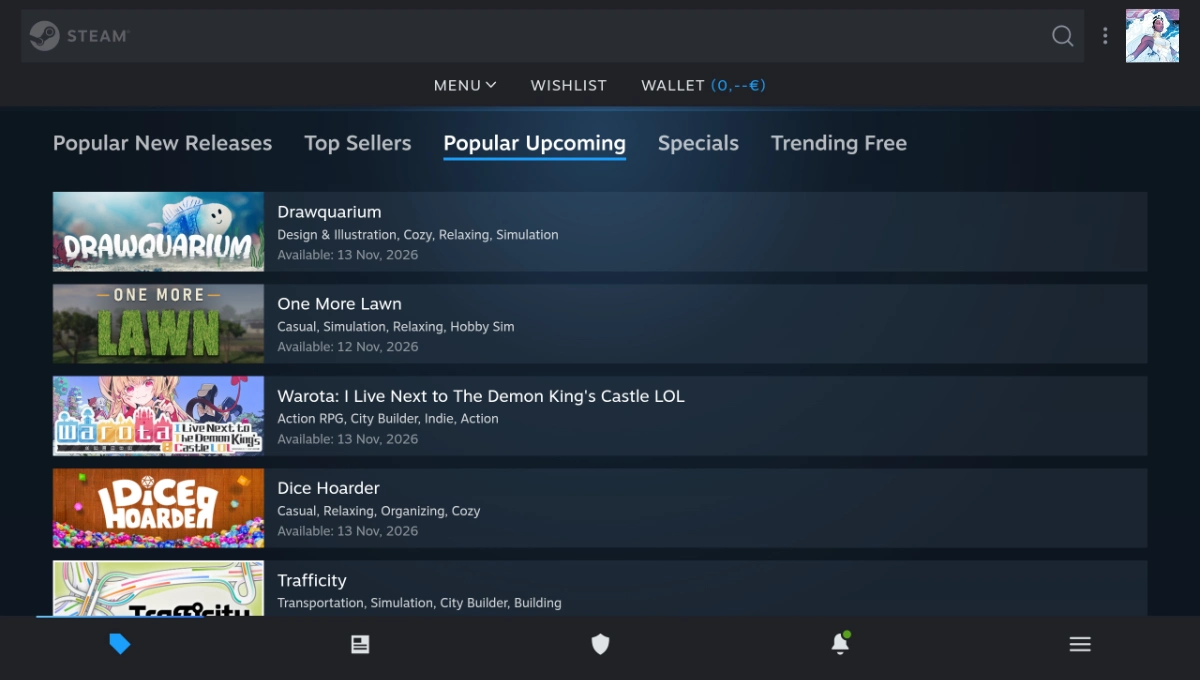
One of the sections where players go to look for upcoming releases is “Popular Upcoming” on Steam. That's where Steam highlights unreleased games that attract the highest levels of player interest and engagement.
Steam’s Popular Upcoming page, with the most popular games yet to come out.
If you're researching how to get game visibility on Steam, focus first on the factors you can control:
Build a clear store page: make the genre, core gameplay and visual identity immediately clear. Use screenshots and a short gameplay trailer to show what players can expect.
Collect relevant wishlists: reach communities likely to enjoy the game through genre-specific subreddits, Discord servers and relevant creator channels.
Prepare a meaningful demo: let players experience the core gameplay loop, then use their feedback to identify confusing mechanics or areas that need improvement.
Coordinate launch marketing: send builds to press and creators in advance, agree on publication dates and any embargoes and prepare announcements for launch day.
Use reviews as feedback: look for recurring complaints about performance, controls or missing information. Fix what you can and explain the changes in your update notes.
Plan meaningful updates: schedule new content, features or events that give existing players a reason to return and create fresh reasons to discuss the game.
Steam's discovery systems are personalized, so no single tactic guarantees visibility. The objective is to create several credible paths for relevant players to find the game and then give them a convincing reason to buy it.
“Focus energy around big events—launch, a major update, or a healthy discount. Think about ways to create the biggest burst of sales and players possible.” – Erik Peterson, Steam Business Team, Valve
Steam Algorithm News: What Changed Recently?
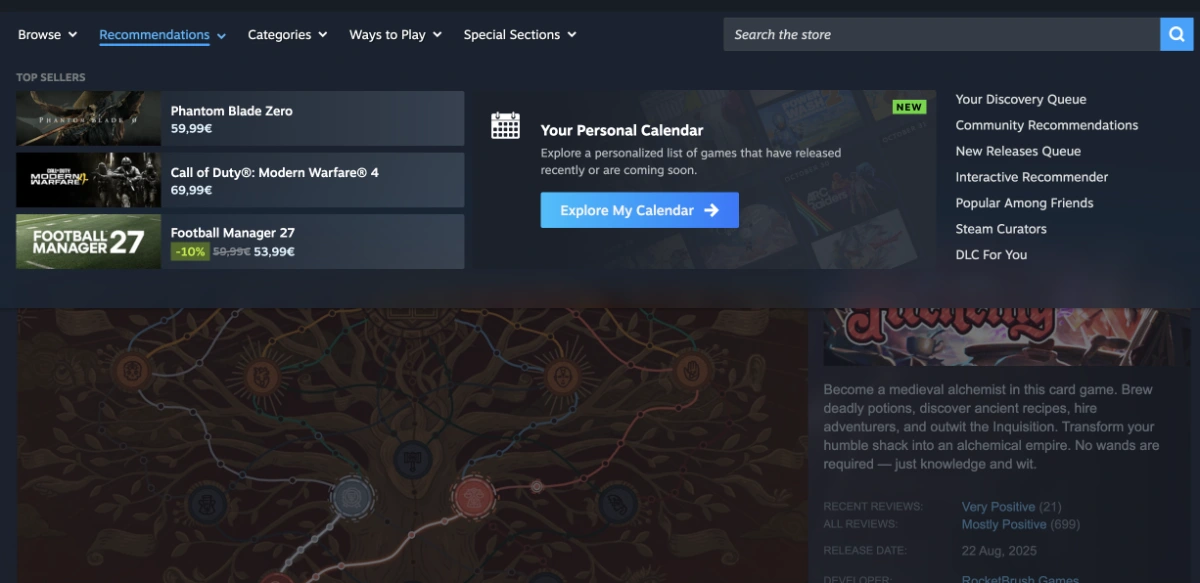
Steam changes more than recommendation rankings: it also updates store layouts, event placements and developer tools. The Personal Calendar shown below is one example. It recommends releases based on the playing habits and wishlists of players with similar tastes.
Personal Calendar in Steam’s Recommendations menu
Here are six recent changes relevant to launch planning, store pages and reporting:
Added screenshot categories and new release-checklist checks. Store pages need at least five screenshots categorized as gameplay.
Include five gameplay screenshots and correctly label any menu, concept-art or cinematic images. Check the updated build-review requirements before submission.
Updated the homepage, Discovery Queue, game previews and Popular Upcoming section.
Review your capsule art, trailers, screenshots, short description, tags and release date.
Common Mistakes That Lower Wishlist Conversion
Even a game with substantial pre-launch interest can underperform if its store page fails to turn that interest into purchase intent.
1. Optimizing for wishlist volume instead of audience fit. Broad campaigns can attract users who like a single image or concept but have little interest in the finished game. Check demo feedback for players who expected a different genre, pace or core mechanic.
2. Using beautiful but unrepresentative artwork. If promotional visuals promise a different experience from the actual gameplay, players may feel misled. Visual polish should reinforce the product's identity instead of disguising it.
3. Hiding the gameplay. A trailer that takes too long to show actual mechanics leaves important questions unanswered. Put the core experience near the beginning.
4. Letting the store page become outdated. Old screenshots, outdated release information and references to features that have changed can weaken confidence. Update the page when the game evolves.
5. Setting a price the page does not justify. Compare full prices and content in similar games. If yours costs more, show what that price includes, such as extra modes, a longer campaign or replayable systems.
6. Releasing without a coordinated plan. Wishlists alone cannot create sustained attention. Prepare announcements, community activity, creator outreach and post-launch communication before the release date.
7. Drawing conclusions from a tiny sample. A single launch or short measurement window rarely provides enough evidence to identify a reliable trend. Compare results across consistent periods and account for external events.
8. Assuming every store page edit improves performance. A redesign may look better without changing player behavior. Document changes, monitor available analytics and avoid changing several major elements simultaneously if you want to understand what helped.
FAQ
What is the average Steam wishlist conversion rate?
There is no official Steam-wide average. Recent studies report different sales-to-wishlist ratios depending on the sample and measurement period. GameDiscoverCo's 2025 analysis found a median first-week ratio of 0.15× among games with more than 25,000 launch wishlists, while a 2026 survey reported a median first-month ratio of 0.22× for games released in 2023–2025. These figures measure total sales relative to launch wishlists, not exclusively purchases by users who had wishlisted the game.
How do you calculate Steam wishlist to sales conversion?
Calculate the total-sales-to-wishlist ratio by dividing the number of sales during a defined period by the number of wishlists immediately before launch. For example, 2,000 first-week sales divided by 20,000 launch wishlists equals 0.10x, or 10%. This metric includes all sales during the selected period, including purchases from players who never wishlisted the game. It should not be confused with the wishlist conversion rate, which measures how many wishlist owners actually purchased the game.
Do wishlists guarantee sales on Steam?
No. Wishlists indicate interest, but players can change their minds, wait for a discount or lose interest before launch. Some sales also come from customers who never wishlisted the game. Use wishlists alongside demo engagement, audience feedback, community activity and comparable release data.
How does the Steam algorithm treat new games?
Steam provides several discovery surfaces and launch-related opportunities, but it does not publish a single formula that predicts a new game's visibility. According to Steamworks documentation, wishlists are generally not a direct algorithmic visibility factor outside specific exceptions, including Popular Upcoming. Developers should focus on reaching relevant audiences, preparing a strong store page and delivering a game that meets player expectations.
Personal Calendar is another important discovery opportunity for upcoming releases. It displays games that individual players are likely to enjoy, based on the playing habits and wishlists of users with similar tastes. Unlike a general popularity ranking, its recommendations are personalized, giving smaller and niche titles a chance to reach relevant audiences.
What store page changes improve wishlist conversion fastest?
Start by checking whether the capsule clearly communicates the game's identity, whether the trailer shows gameplay early and whether the screenshots and short description explain the experience. These are practical first priorities because they address common questions players have before buying. However, no single edit is guaranteed to improve conversion; measure results over a consistent period and consider other factors affecting demand.
Why Choose RocketBrush for Steam Store Page Art
RocketBrush Studio creates Steam store art for game developers and publishers. Our work covers:
Capsule images for store listings, recommendations and carousel placements.
Key art and promotional illustrations for Steam store pages.
Library artwork and adaptations for different Steam formats.
Over the past 10 years in business, we have provided game art services to more than 150 clients. Our Steam capsule portfolio includes such games as Luma Island, Life in Frydenlund, Ways of Alchemy, The Unliving and BPM Bitcrushed across different genres: farming adventures, card games, dark fantasy action and rhythm shooters. You can find these projects in our Steam capsule art guide.
Whether you need new artwork or adaptations of existing assets, send us your visual references and required formats to discuss your Steam store art project.
Create with us
Contact us, and we'll craft the perfect game art for your project