menu
Close

GET IN TOUCH
Check what other game developers say about working with RocketBrush Studio:

BLOG
Choosing between 3D art styles for games is not just a matter of visual taste. It affects asset complexity, production time, performance, readability and how easily the look can scale across new content.
In production, 3D game art styles are easier to understand as a combination of decisions rather than a single label. A game may be stylized in its overall direction, low-poly in its geometry, PBR-based in its materials and isometric in its presentation. Separating these layers helps teams choose references, estimate scope and keep the final look consistent.
The image below breaks these decisions into four practical layers: style direction, geometry, surface and rendering, and presentation. It is not meant to cover every possible aesthetic label, but it gives a clearer way to read and plan 3D art direction in production.
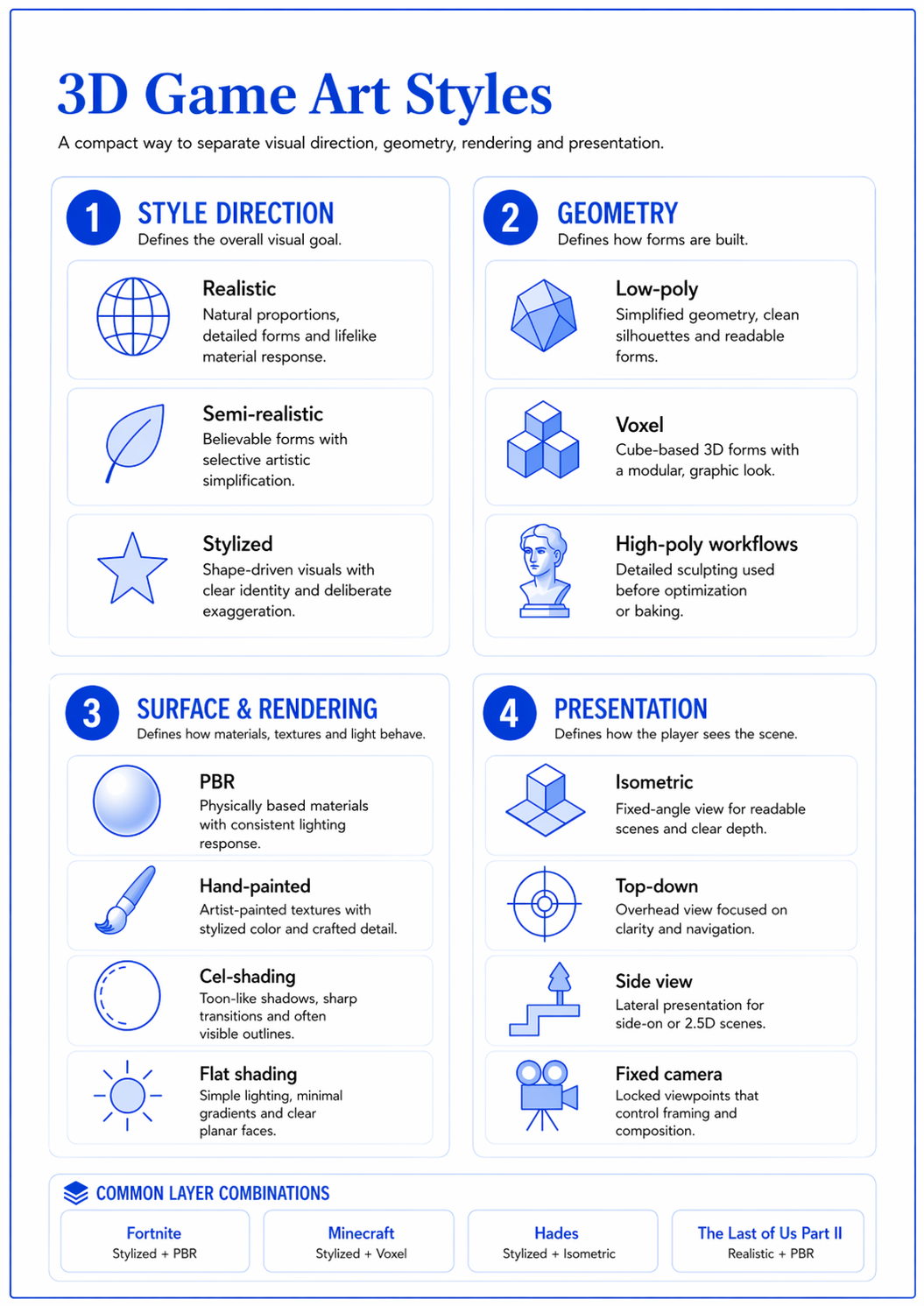
In this guide, we break down the main types of 3D game art styles and explain what each one means for production. Rather than treating every visual label as a separate style, we look at 3D art as a layered system: the visual goal, the way assets are modeled, how materials are rendered, how the scene is presented and what mood the world should communicate.
This does not cover every possible aesthetic label. A project can still add genre, tone and theme on top of these layers – fantasy, sci-fi, gothic, cozy, anime-inspired or neo-noir, for example. For production planning, this layered view is usually more useful because it affects scope, consistency, performance and asset creation.
In game development, 3D game art style is often used as a broad term. Sometimes it describes how realistic the game looks. Sometimes it describes geometry, like low-poly or voxel art. Sometimes it refers to rendering, such as PBR or cel-shading. And sometimes it describes the camera or presentation, such as isometric. So, these are not competing categories but are layers that can be combined.
For example:
This is why 3D art styles are easier to understand as a stack of production choices rather than a single label.
Mood and theme are not separate production methods, but they strongly shape references, color, lighting, silhouettes and environment details. A game can be stylized and gothic, realistic and sci-fi or semi-realistic with fantasy subject matter.
The sections below focus on the 3D art directions that usually matter most when planning production scope, visual consistency and long-term asset creation.
Realistic 3D art aims for believable proportions, detailed forms, natural materials and lighting that feels close to the real world. It is common in high-end PC and console games, cinematic scenes, realistic environments, vehicles, weapons, props and hero assets.
This direction usually needs a detailed production pipeline. Artists often work with real-world references, high-detail modeling or sculpting, optimized topology, baked maps, PBR materials and careful lighting. The goal is not only to make an asset look good in isolation, but to make it hold up inside the game engine and match the rest of the world.
The example below shows how the same principles apply to a large environment: believable materials, scale, lighting and set dressing all work together to support the scene’s realism.
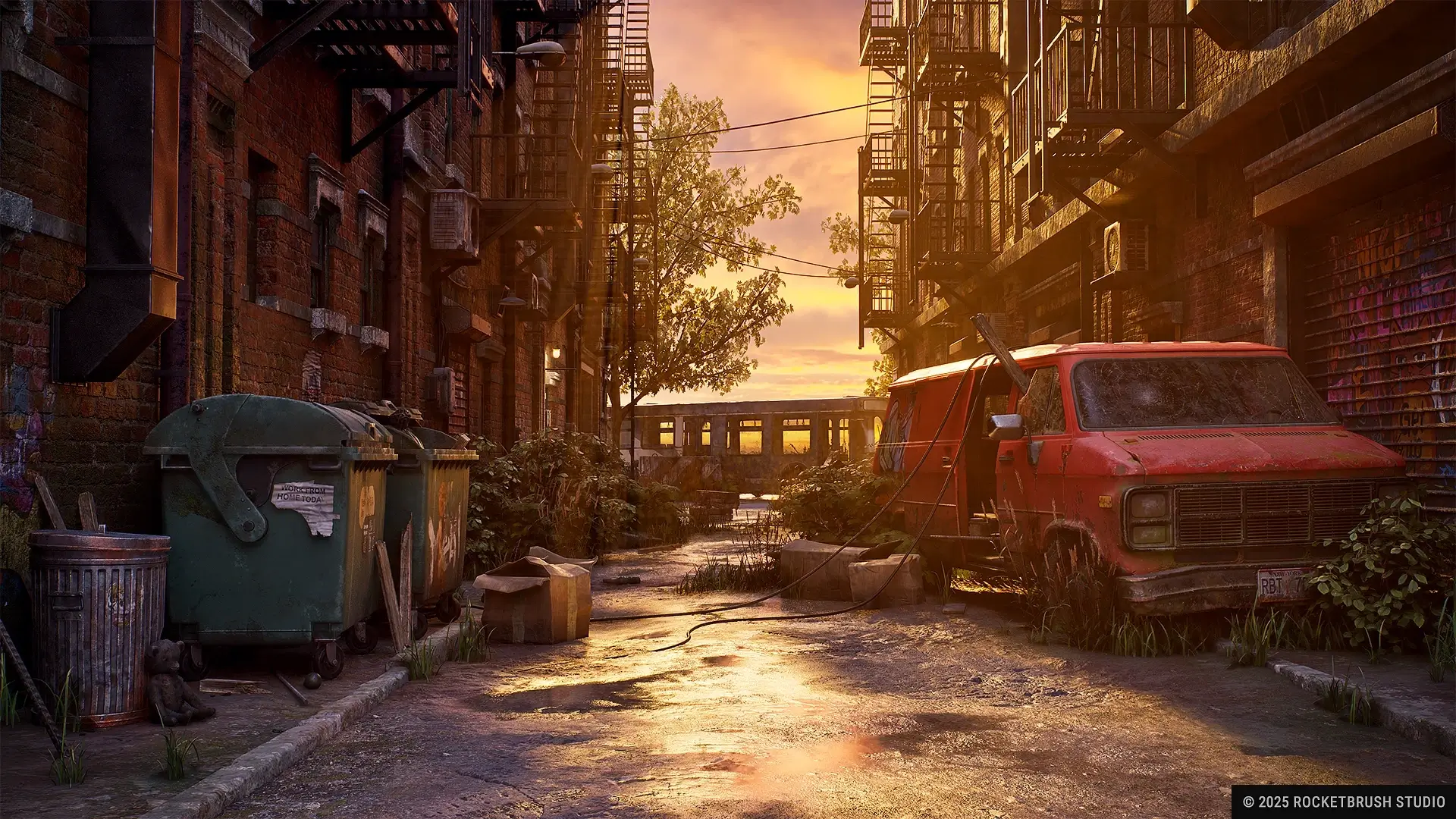
Realistic 3D game art works best when the game needs immersion, grounded worldbuilding or a premium visual target. The trade-off is scope. Every extra detail can affect modeling, texturing, optimization, lighting and review time.
For teams planning realistic 3D, the strongest references are not just beautiful images. They should also clarify material quality, target polycount, texture density, lighting conditions and how the asset will be used in gameplay.
[[cta:Need game art for your next project?:Tell us about your game, and we'll assemble a production-ready art team with a pipeline tailored to your style, platforms and deadlines.]]
Semi-realistic 3D art sits between realism and stylization. It keeps enough believable structure, proportions and material logic to feel grounded, but simplifies selected forms and details for readability, consistency or production efficiency.
This direction is useful when a project needs more visual weight than a fully stylized look, but does not require the full complexity of photorealism. It is common in strategy games, simulation titles, military assets, vehicles and projects where objects need to remain recognizable from gameplay distance.
The example below shows how semi-realistic 3D works in practice. These vehicle assets preserve recognizable forms and believable surface treatment, but they are still adapted for strategy gameplay, technical limits and clear visual readability.
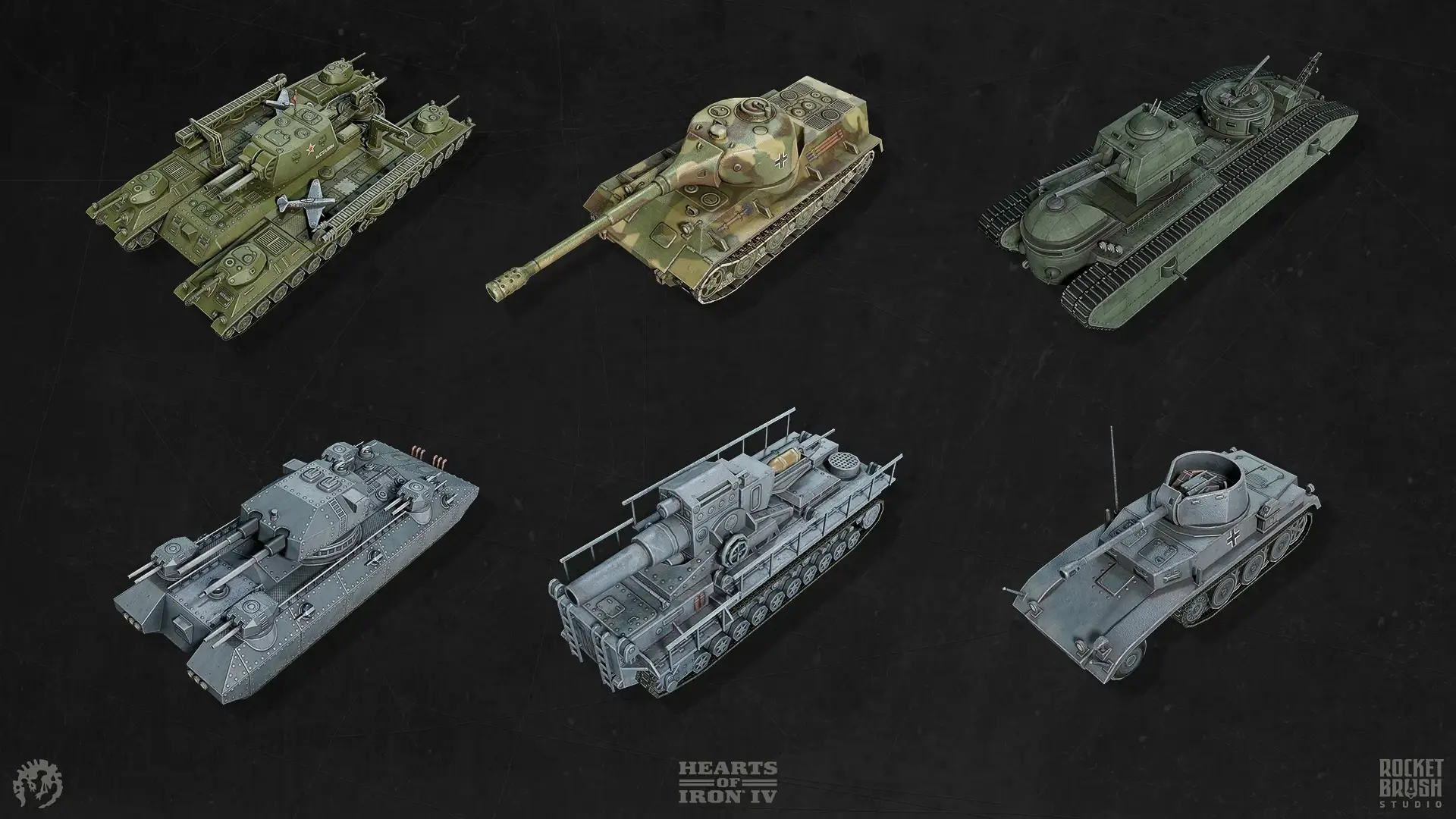
Semi-realistic 3D can be especially practical for projects that need both clarity and visual weight. It gives art teams room to keep assets recognizable and believable while still adapting them to gameplay camera, engine limitations and production scope.
The key is consistency. Teams usually need to define early which elements should stay grounded, which can be simplified and how much detail will still be readable in the final game view.
Stylized 3D art moves away from realistic reproduction and focuses on artistic control. It usually relies on deliberate shape language, simplified forms, selective detail and color choices that help assets feel distinctive and readable.
This direction is often a strong fit for games that need a clear visual identity, broad audience appeal or scalable production. Stylization does not mean “less work” by default – it means the team makes more intentional decisions about what to simplify, exaggerate or emphasize.
The example below shows a typical stylized 3D approach in production: readable shapes, simplified forms and selective detail help the asset stay visually strong while remaining game-ready.
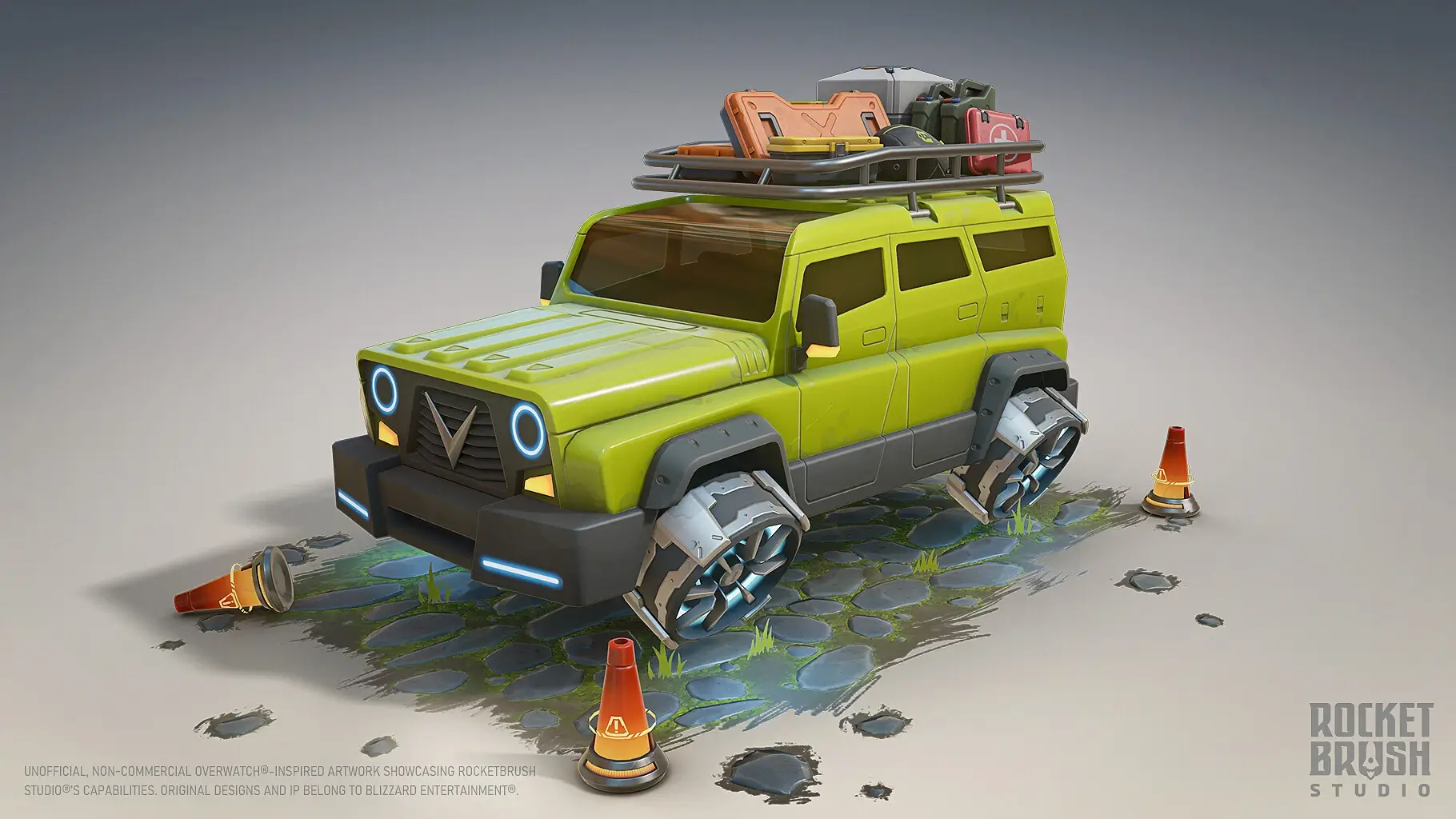
Stylized 3D game art often scales well because it does not always require extreme surface detail. But it is not automatically easier. The art direction has to be disciplined. Shape language, proportions, texture treatment and lighting need to follow the same rules across the whole game.
Stylized art can also use other layers from the framework. A game may be stylized and low-poly, stylized with PBR materials, stylized with hand-painted textures or stylized with cel-shading. The style direction defines the goal, while the other layers define how the look is built.
Low-poly 3D art uses simplified geometry and readable forms. In older games, low polygon counts were mostly a technical limitation. Today, low-poly can be a deliberate visual choice or a production approach, especially for mobile games, indie projects, stylized worlds and lightweight pipelines.
Low-poly does not mean low quality. It can be visibly geometric, but it can also support a polished stylized look when clean silhouettes, texture work and controlled detail are handled well. The challenge is to simplify without making the assets feel unfinished.
The example below shows low-poly as a stylized production approach: the scene keeps readable forms and optimized assets while using color, texture work and composition to create a rich game-ready environment.
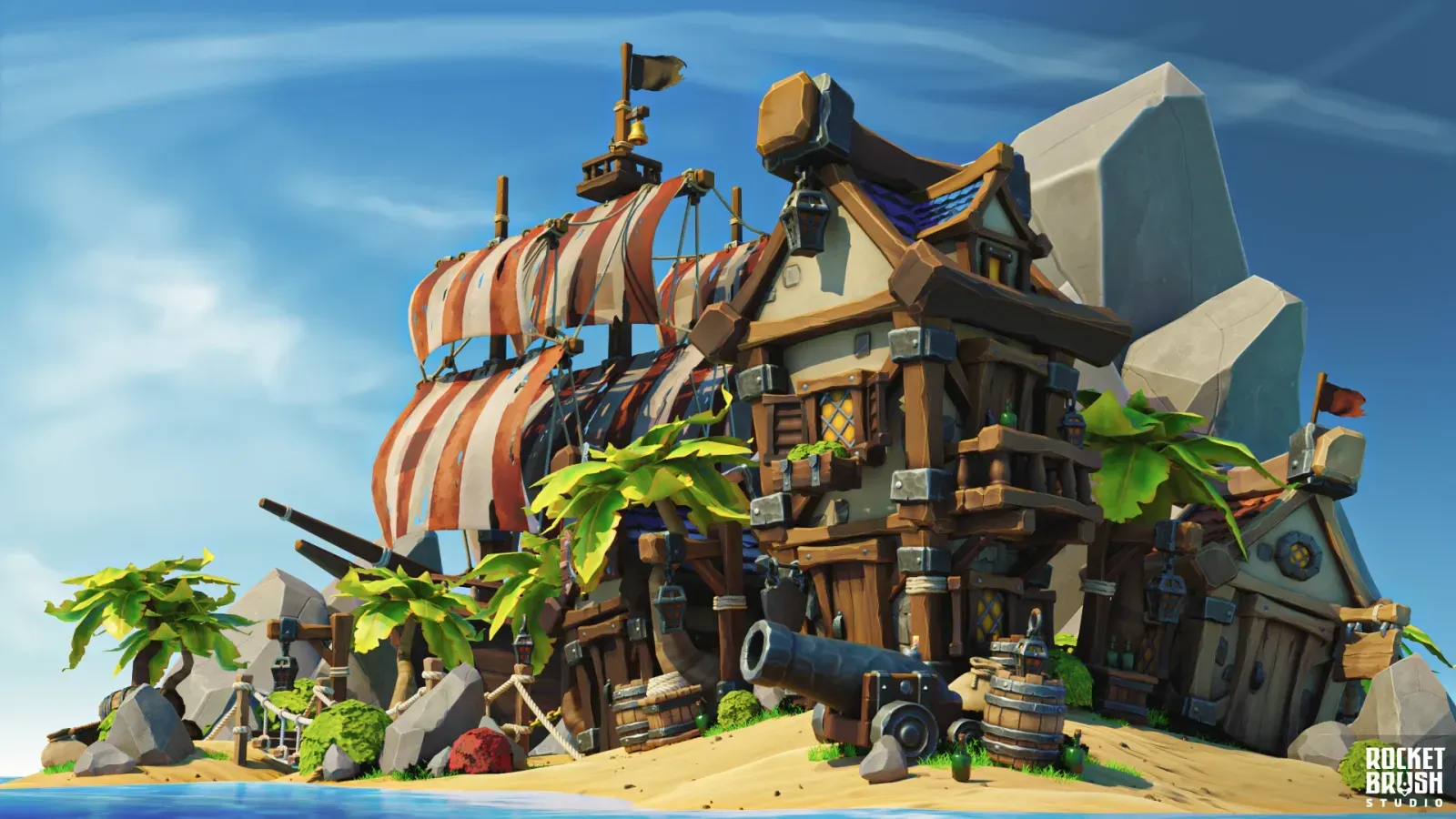
This approach can be useful when a project needs fast iteration, good performance or a clean visual language. It also works well when many assets must be produced consistently across a large environment or content set.
Low-poly can combine with different 3D art styles. It can be bright and playful, dark and atmospheric, realistic in proportion or highly stylized. Geometry is only one layer of the final look.
PBR, or physically based rendering, is not a visual style in the same sense as realistic, stylized or semi-realistic art. It is a rendering and material workflow that helps surfaces respond to light in a more consistent and predictable way.
In production, PBR usually relies on values such as base color, roughness, metalness and normal detail. This gives artists a more reliable system for building materials that behave correctly in different lighting conditions inside the engine.
PBR is widely used in realistic games, but it is not limited to realism. It can also support semi-realistic and stylized projects, as long as the art direction defines how far material realism should go.
The example below shows this clearly: the character and bike are stylized in form, but the materials, wear, texture response and surface treatment rely on a PBR-based approach.
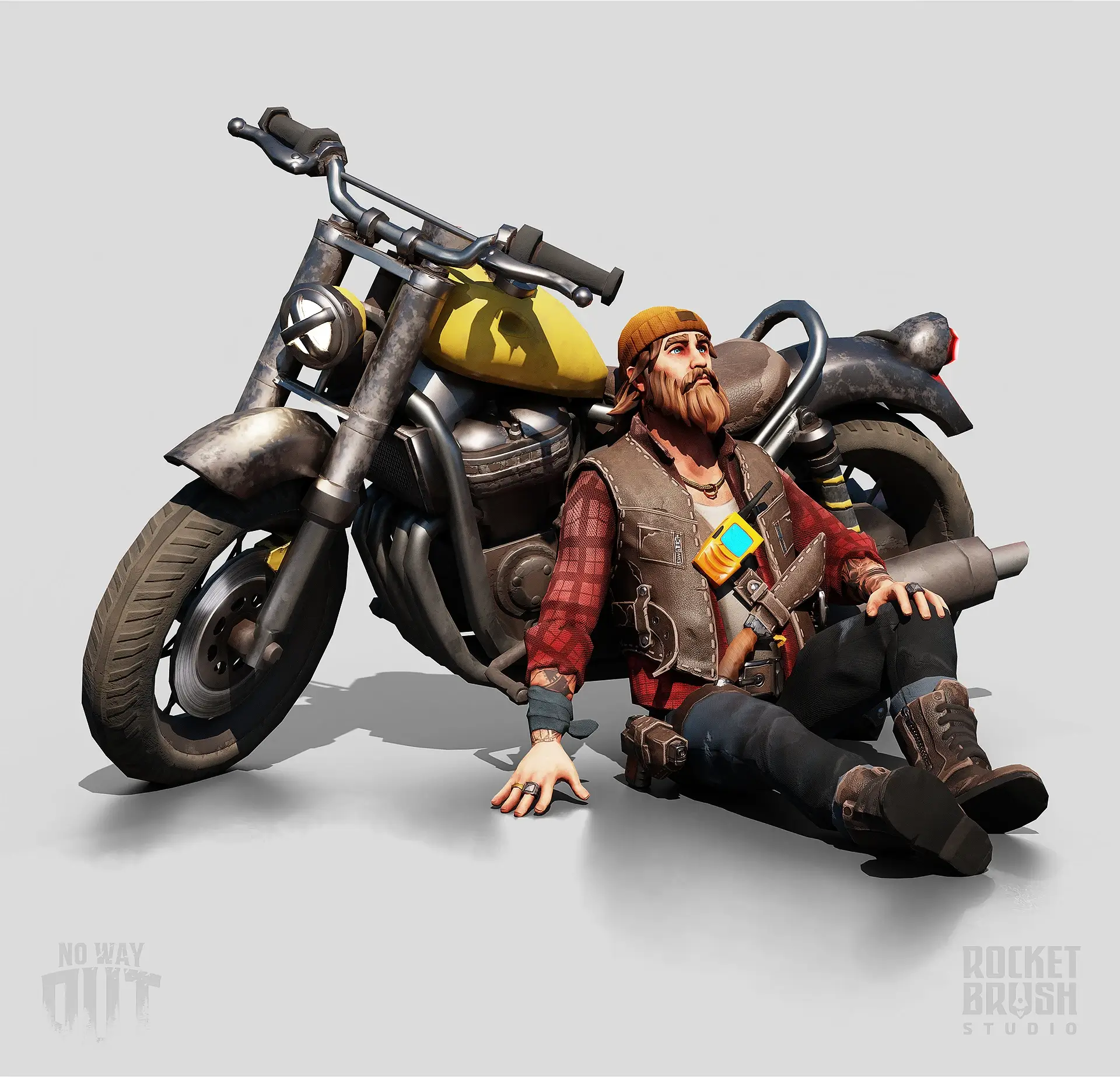
PBR is important because it supports consistency, not because it defines the whole visual direction by itself. Two games can both use PBR and still look completely different depending on their style direction, geometry choices and presentation.
That is why PBR should be treated as one layer in the overall art framework. It helps materials behave well in-engine, but it still needs strong art direction to produce a clear and appealing final look.
Isometric 3D is primarily a presentation approach, not a pure art style. It describes how the player sees the scene: usually from a fixed or semi-fixed angle that shows the environment from above and from the side.
At the same time, isometric 3D has a strong impact on production. It affects environment composition, silhouettes, object height, ground readability, prop placement, character scale and how much detail should be visible from the chosen camera angle.
The example below shows why the camera matters so much in isometric-style production. For a fixed mobile view, the environment can be built around what the player actually sees: readable room layouts, clear object hierarchy and optimized geometry that still appears detailed from the target perspective.
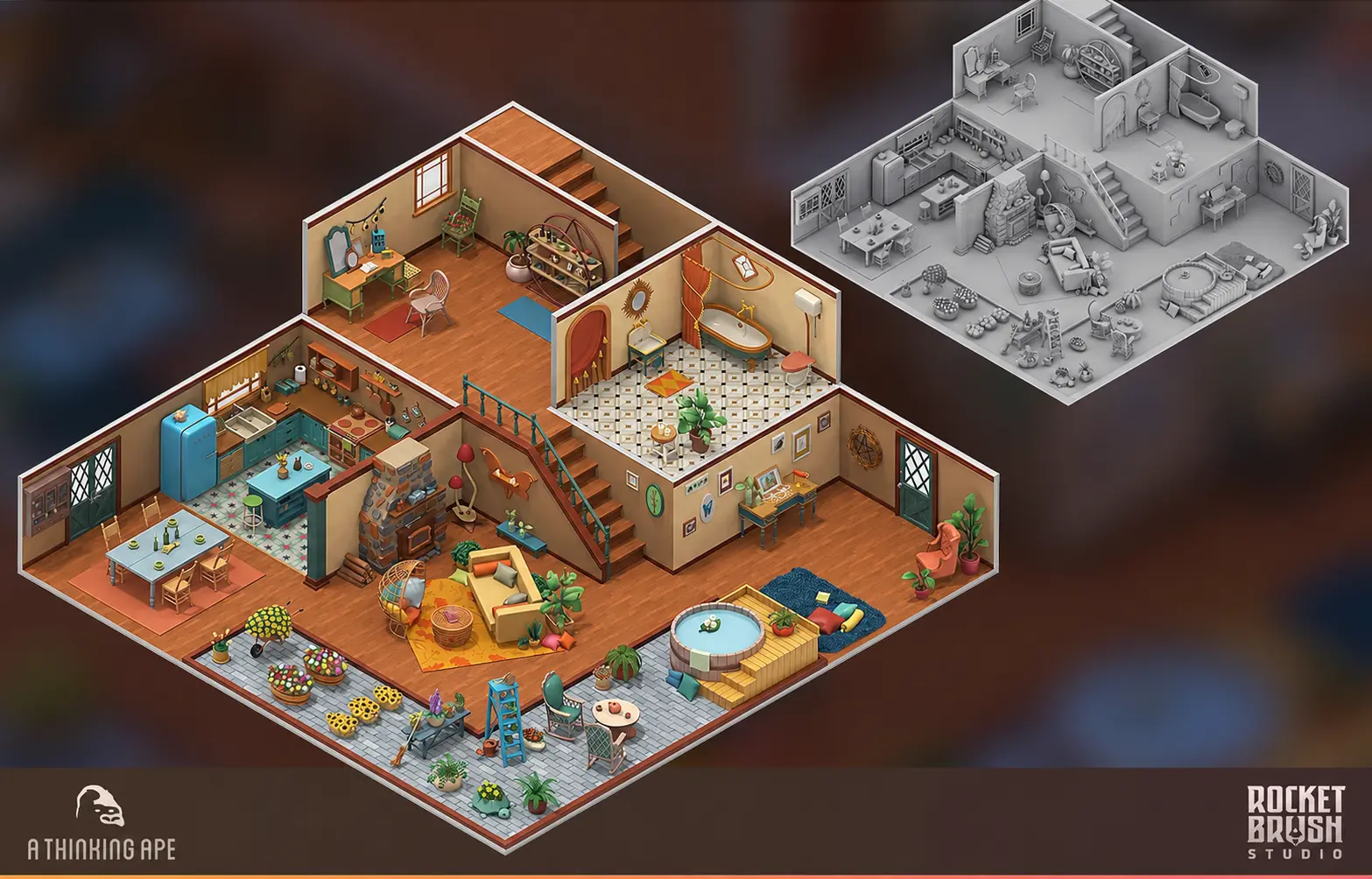
This is why teams often discuss isometric as a separate visual direction even though it belongs to the presentation layer. An isometric game can be realistic, semi-realistic, stylized, low-poly or hand-painted. The camera does not define the whole style, but it shapes many production decisions.
When planning isometric 3D, it is better to test assets in the target camera early. Concept art, modeling and level composition should support the actual view the player will use.
Some terms are useful, but they belong to different layers or describe a mood rather than production structure. Here is how to read them in a production context:
This is why a full list of 3D video game art styles can become confusing if every term is placed on the same level. Searches for types of 3D art can also refer to asset categories – characters, environments, props, vehicles and UI-related 3D elements. This article focuses on 3D styles as visual and production choices, not asset taxonomy.
Broad searches like game art styles 3D, video game art styles 3D or 3D video game art styles often return mixed lists for the same reason. A practical framework separates what the art is trying to achieve from how it is modeled, rendered and presented.
The right 3D game style is the one your team can execute consistently, not just the one that looks best in references. A visual direction has to work across gameplay, content volume, target platforms, budget and the production team available.
A tactical game, a racing game, a cozy builder and a third-person action game need different visual priorities. Some games need visual density and material detail. Others need fast readability, clear silhouettes or modular environments.
Different types of 3D games create different production limits. Platform affects how much geometry, texture detail, lighting complexity and post-processing the game can support. Mobile-first projects often benefit from stronger simplification and readable shapes. PC and console projects can support more detailed assets, but still need optimization.
This does not mean mobile must be low-poly or PC must be realistic. It means the visual direction should be realistic about performance and content production.
A game with hundreds of props, skins, buildings or characters needs a style that can scale. Highly detailed realistic assets may work for a small premium set, but become expensive if the game needs constant content updates.
For live games, semi-realistic, stylized or low-poly approaches can sometimes give a better balance between quality and production speed.
This helps avoid one of the most common problems in 3D art production: assets that are individually good but inconsistent as a set.
References are useful, but they can also create confusion. One reference may show mood, another may show geometry, another may show texture style and another may show lighting. If the team does not separate these layers, artists may interpret the same brief differently.
This is especially important when working with an external art partner or scaling production across several artists. Unique 3D art styles usually come from clear production rules, not from adding more visual references.
3D game art styles are easier to plan when you separate the main production layers.
At RocketBrush, we support 2D and 3D game art production across different styles, asset types and pipelines. If you are planning a new visual direction or need help scaling existing production, send us your references, scope and deadlines at hello@rocketbrush.com – we will help align the art approach with your game, platform and budget.